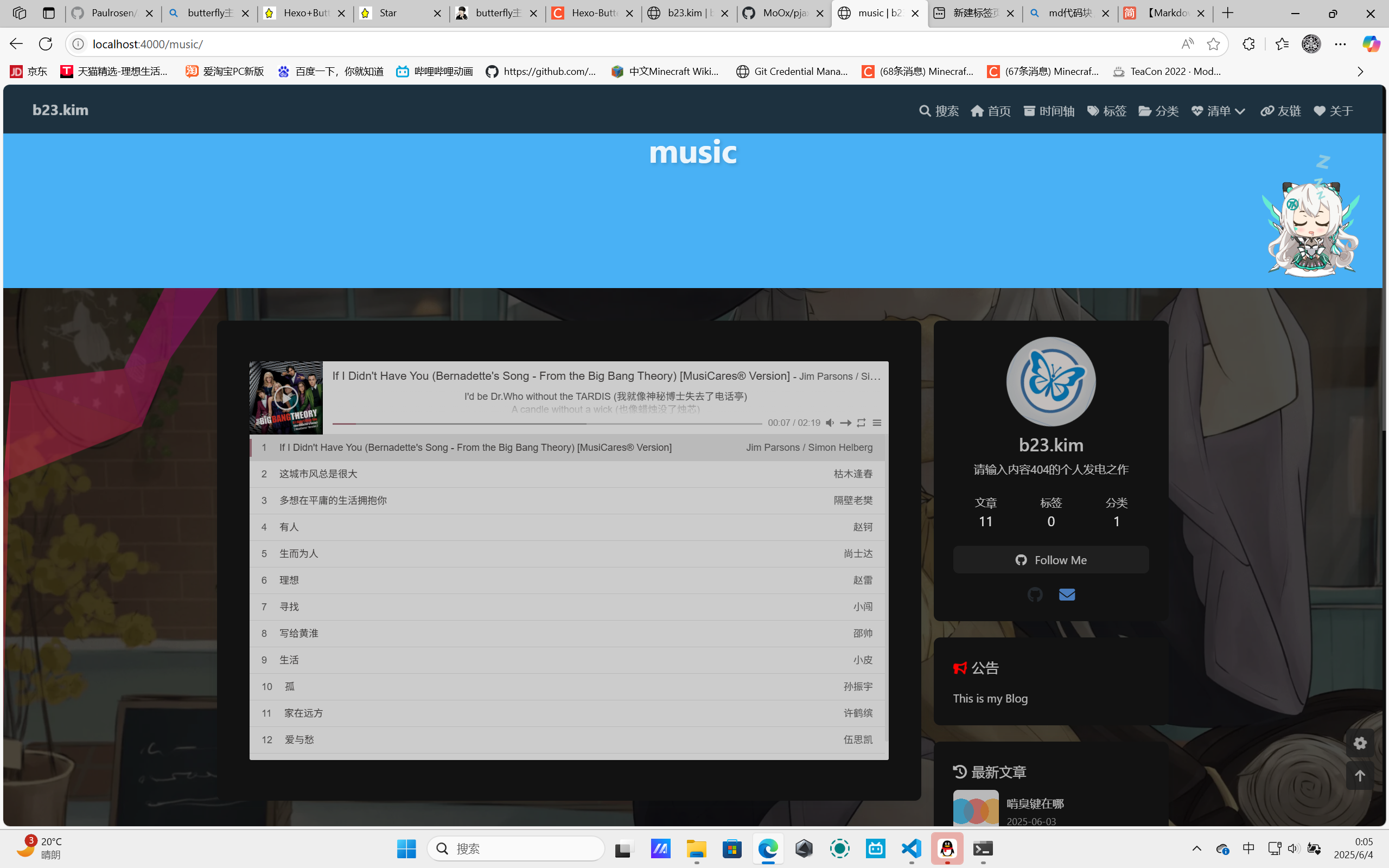
今天来建设博客,顺便写教程。
编写配置 首先去主题配置里面里面搓配置(_config.butterfly.yml):
1 2 3 4 aplayerInject: enable: true per_page: true
把这俩都打开就行了,它会自动帮你引入js资源(注意:不要和下方的inject重复配置)
1 2 3 4 5 6 pjax: enable: true exclude:
直接把enable的值设置为true即可,方便又省事
然后包括Hexo本身配置也要写基本声明(_config.yml):
1 2 3 4 aplayer: meting: true asset_inject: false
没有就新建,有就修改(不过一般默认这里是不带的,都是要自己加进去)asset_inject字段,如果你不是butterfly主题,同时又不想手动引入js资源,就可以直接在这里设置为true。它会自动完成资源配入。
无论以何种方式设置完成后,它会引入aplayer.js和meing.js资源。
对于某些需要VIP的歌曲,仅会返回前30秒的音频流(类比app端的“试听”)
安装依赖 然后安装aplayer依赖到本地npm install --save hexo-tag-aplayer{% meting "7422861869" "netease" "playlist" "autoplay" "mutex:false" "listmaxheight:400px" "preload:none" "theme:#ad7a86"%}这个模板)
1
2
3
4
5
6
7
8
9
10
11
12
13
14
15
16
17
18
19
20
21
22
23
24
25
26
27
28
29
30
31
32
33
C:\others\hexo\b23.kim>hexo g && hexo s INFO Validating config INFO =================================================================== 5.3 .5 =================================================================== INFO Start processing FATAL Something's wrong. Maybe you can find the solution here: https://hexo.io/docs/troubleshooting.html Nunjucks Error: music/index.md [Line 1, Column 4] unknown block tag: meting ===== Context Dump ===== === (line number probably different from source) === 1 | {% meting "7422861869" "netease" "playlist" "autoplay" "mutex:false" "listmaxheight:400px" "preload:none" "theme:#ad7a86"%} 2 | ===== Context Dump Ends ===== at formatNunjucksError (C:\others\hexo\b23.kim\node_modules\hexo\dist\extend\tag.js:145:15) at C:\others\hexo\b23.kim\node_modules\hexo\dist\extend\tag.js:213:46 at tryCatcher (C:\others\hexo\b23.kim\node_modules\bluebird\js\release\util.js:16:23) at Promise._settlePromiseFromHandler (C:\others\hexo\b23.kim\node_modules\bluebird\js\release\promise.js:547:31) at Promise._settlePromise (C:\others\hexo\b23.kim\node_modules\bluebird\js\release\promise.js:604:18) at Promise._settlePromise0 (C:\others\hexo\b23.kim\node_modules\bluebird\js\release\promise.js:649:10) at Promise._settlePromises (C:\others\hexo\b23.kim\node_modules\bluebird\js\release\promise.js:725:18) at _drainQueueStep (C:\others\hexo\b23.kim\node_modules\bluebird\js\release\async.js:93:12) at _drainQueue (C:\others\hexo\b23.kim\node_modules\bluebird\js\release\async.js:86:9) at Async._drainQueues (C:\others\hexo\b23.kim\node_modules\bluebird\js\release\async.js:102:5) at Async.drainQueues [as _onImmediate] (C:\others\hexo\b23.kim\node_modules\bluebird\js\release\async.js:15:14) at process.processImmediate (node:internal/timers:485:21)
就这样水灵灵的报错了,没有相关包是这样的。metingJS和aplayerJS。
然后当你安装完aplayer的npm依赖以后,可能会对控制台的输出感到震惊:
1
2
3
4
5
6
7
8
9
10
11
12
13
14
15
16
C:\others\hexo\b23.kim>npm install --save hexo-tag-aplayer npm warn deprecated source-map-url @0.4 .1 : See https://github.com/lydell/source-map-url npm warn deprecated urix@0.1 .0 : Please see https://github.com/lydell/urix npm warn deprecated source-map-resolve @0.5 .3 : See https://github.com/lydell/source-map-resolve npm warn deprecated rimraf@2.4 .5 : Rimraf versions prior to v4 are no longer supported npm warn deprecated resolve-url @0.2 .1 : https://github.com/lydell/resolve-url npm warn deprecated glob@6.0 .4 : Glob versions prior to v9 are no longer supported npm warn deprecated hexo-bunyan @1.0 .0 : Please see https://github.com/hexojs/hexo-bunyan /issues/17 npm warn deprecated highlight.js@8.9 .1 : Version no longer supported. Upgrade to @latest npm warn deprecated core-js @2.6 .12 : core-js @ <3.23 .3 is no longer maintained and not recommended for usage due to the number of issues. Because of the V8 engine whims, feature detection in old core-js versions could cause a slowdown up to 100 x even if nothing is polyfilled. Some versions have web compatibility issues. Please, upgrade your dependencies to the actual version of core-js . added 193 packages in 8 s 44 packages are looking for funding run `npm fund` for details
我勒个,怎么新增了193个包,我还从来没见过包这么多的依赖
基本使用 前面的那个模板是aplayer的普通页面模式 ,具体样式大概……呃我也不知道咋描述一个页面
不仅仅是模板(aplayer-tag)写法,html原生标记同样可以<div class="aplayer no-destroy" data-id="1441758494" data-server="netease" data-type="song" data-autoplay="true" data-lrcType="-1"> </div>
当然它还有迷你版播放器,就很适合挂在博客下面(事实上很多博客已经这么做了)<div class="aplayer no-destroy" data-id="547187496" data-server="netease" data-type="playlist" data-fixed="true" data-mini="true" data-listFolded="false" data-order="random" data-preload="none" data-autoplay="true" data-volume="0.5" muted></div>
参考:https://kymlin.github.io/2021/11/29/hexo/butterfly%E9%85%8D%E7%BD%AE%E8%83%8C%E6%99%AF%E9%9F%B3%E4%B9%90/ https://blog.csdn.net/qq_41467882/article/details/124734598